

A Practical Guide on How to Optimize Your Docs for Agents

A recent Y Combinator podcast mentioned that the biggest reason Supabase has become a default choice for coding agents is that their docs are easy to follow. But if my manager were to ask me to “make our docs like Supabase,” I wouldn’t know where to start. There are a million differences between Supabase and any given product, so how do I know which traits made a difference and which traits are superficial?
It’s hard to deny what’s happening around us: agents are reading more documentation, humans are reading less. This trend is likely to continue, and will likely accelerate. This article offers a perspective that tries to get closer to first principles on what adjustments to your docs are worth making, based on how LLMs are built and how they behave, grounded in research from top labs.
To be clear, we’re not advocating for a separate set of “agent docs.” You’ll find that many of these changes improve the human experience too. And where there’s a real trade-off, we’ll call it out.
How agents consume your docs today
Section titled “How agents consume your docs today”Before we talk about optimization, it helps to ground ourselves in the concrete ways agents run into your documentation. In practice, there are 3 main pathways. Depending on your product, you can decide which ones matter most to optimize for.
1. Web search and fetch
Section titled “1. Web search and fetch”When agents like ChatGPT, Claude, and Gemini browse the web, they typically use two tools: search and fetch.
The search tool accepts a query and returns a list of page titles and URLs without body text. For example, this is the output that Claude Code sees when it searches “how to create a payment link in stripe”:
[ {"title":"Stripe Payment Links | Simple Links to Accept Payments","url":"https://stripe.com/payments/payment-links"}, {"title":"Create a payment link | Stripe Documentation","url":"https://docs.stripe.com/payment-links/create"}, {"title":"Create Payment Links | Stripe Documentation","url":"https://docs.stripe.com/no-code/payment-links"}, ...]The agent reads the titles and decides which URLs are worth fetching. If your critical information is spread across 5 different pages with the same title “Overview”, that makes it harder for the agent to know which one to dig into.
When the agent fetches, it programmatically strips the HTML down to markdown or plain text, or fetches the markdown version of the page directly. Code blocks, tables, and headings survive this conversion well. Images, certain diagrams, and anything loaded dynamically via JavaScript don’t. This means that it’s better to avoid references like “click the green button in the upper-left corner of the screenshot below.” (As LLMs become more natively multimodal this will matter less, but fewer dependencies is always better.)
The “minimum retrievable unit” in web fetch is the full page. Unlike RAG, the agent gets the entire page instead of a targeted chunk appended to its working context.
2. RAG systems (support bots)
Section titled “2. RAG systems (support bots)”Tools like Kapa, Intercom’s Fin, doc platform “Ask AI” features, and many in-house support chatbots fall into this category. They ingest your docs, split them into chunks, and retrieve relevant chunks when a user asks a question.
Most often, the chunking strategies will follow the heading structure. The text under an ## H2 or ### H3 often becomes a retrievable unit. Now combine tens of those units pulled from very different parts of the docs and add them to the context at once. That’s what the LLM/agent usually sees.
3. MCP/tool calling (via tool descriptions)
Section titled “3. MCP/tool calling (via tool descriptions)”The Model Context Protocol is an open standard that lets agents programmatically interact with external tools and services. If your team is building an MCP server on top of your product’s API, then your tool names, descriptions, and parameter schemas become a first-class citizen of your documentation.
Two research findings are worth mentioning here. First, an evaluation of LLM tool use over an API found that terminology consistency matters more than you’d expect. If your tool descriptions alternate between rate limit, quota, and throttle, or archive, deactivate, disable, the model has to guess whether those are describing the same or completely different concepts, which leads to worse tool use. The same applies to inconsistent function names, vague parameter descriptions, and overlapping tool scopes. Something worth keeping in mind when you write for MCP is to try to reduce ambiguity for the agent every step of the way.
Second, a study on tool selection bias in LLMs found that LLMs select tools based almost entirely on semantic alignment between the user’s query and the tool description. This means descriptions should be written from the user’s perspective (what task does this tool accomplish?), not from the implementation perspective (how does this tool work?).
Imagine an LLM trying to choose between your tool and a competitor’s. Your underlying tool function is much more robust and elegant, but has “handle auth stuff” as the description, versus theirs has spaghetti code generated by GPT 3.5, but clear, precise descriptions. The LLM will pick theirs.
What actually helps
Section titled “What actually helps”1. Make sections self-contained
Section titled “1. Make sections self-contained”When an agent retrieves a chunk of your docs, it often gets that chunk without the surrounding context. So if the chunk says something like “use the payment object from above,” the agent may have no idea what “above” refers to. Some agents will try to chase the reference, but many RAG setups only support semantic search (finding content by meaning rather than exact keywords) rather than letting the agent reliably fetch “the chunk above this one.”
Now add two practical constraints. First, when an agent can’t find a referenced piece of information, it doesn’t always stop and say so, instead it’ll make a plausible-sounding guess. This is one of the main sources of hallucination (see Why Language Models Hallucinate). Second, most agents have an upper limit on how many steps they can take before stopping, usually around 100–200. Lots of “see above / previous page” phrases can lead to agents burning through that budget hunting for context, and stopping before they’ve found what actually matters.
There’s also empirical evidence that spreading content across too many files can make retrieval harder for LLMs. In one controlled study, researchers kept the total context length and the position of the relevant information fixed, and varied only how many separate documents that context was split across. They found that increasing the document count in RAG settings could reduce performance by up to 20%.
Write as if you’re doing a radio interview and you don’t want to be quoted out of context.
— November 2025 Write the Docs Newsletter
What to do: Avoid forward and backward references like “see above,” “as described in the previous section,” or “same as before.” Instead, restate the key information. This doesn’t mean duplicating entire sections - just the critical bits that make each section stand better on its own. Kubernetes does this well by including a “Before you begin” block at the top of related pages for hard prerequisites (for example, Adding Linux nodes).
One practical way to do this without cluttering the page for human readers: put prerequisites, environment setup, etc. in expandable blocks. The information is present for agents parsing the full page, but it doesn’t interrupt the main flow for humans who have already completed the setup.
Many style guides already discourage “see above” and similar phrasing. This is the same principle, just higher stakes for agents.
2. Document failure modes, known bugs, and edge cases
Section titled “2. Document failure modes, known bugs, and edge cases”This is the recommendation where optimizing for agents and optimizing for humans diverge the most. That being said, the form factor doesn’t have to clash. You can put added content in expandable sections at the bottom of each main page. If it makes pages too long, house it under a dedicated part of your docs (think an additional section in the sidebar).
A survey on code generation with LLM-based agents found that agents struggle particularly with “unwritten team conventions” and “non-public, highly contextualized information.” Separately, research on resilient LLM agent architecture found that agents with access to structured failure information performed significantly better than agents trying to reason about errors from their general knowledge. (Side note: I think agent self-recovery and self-evolution will matter even more over time.)
A paper on automated prompt optimization for LLM agents found that vague guidance like “consider edge cases” or “be thorough” consistently underperformed compared to explicit, structured instructions with concrete examples and edge cases, which improved accuracy by 10.1%–36.9%.
Stripe is also a good example of documenting failure modes. Its error codes page maps each code to a description (and often resolution steps), and the API returns a doc_url field that points directly to the relevant documentation entry.
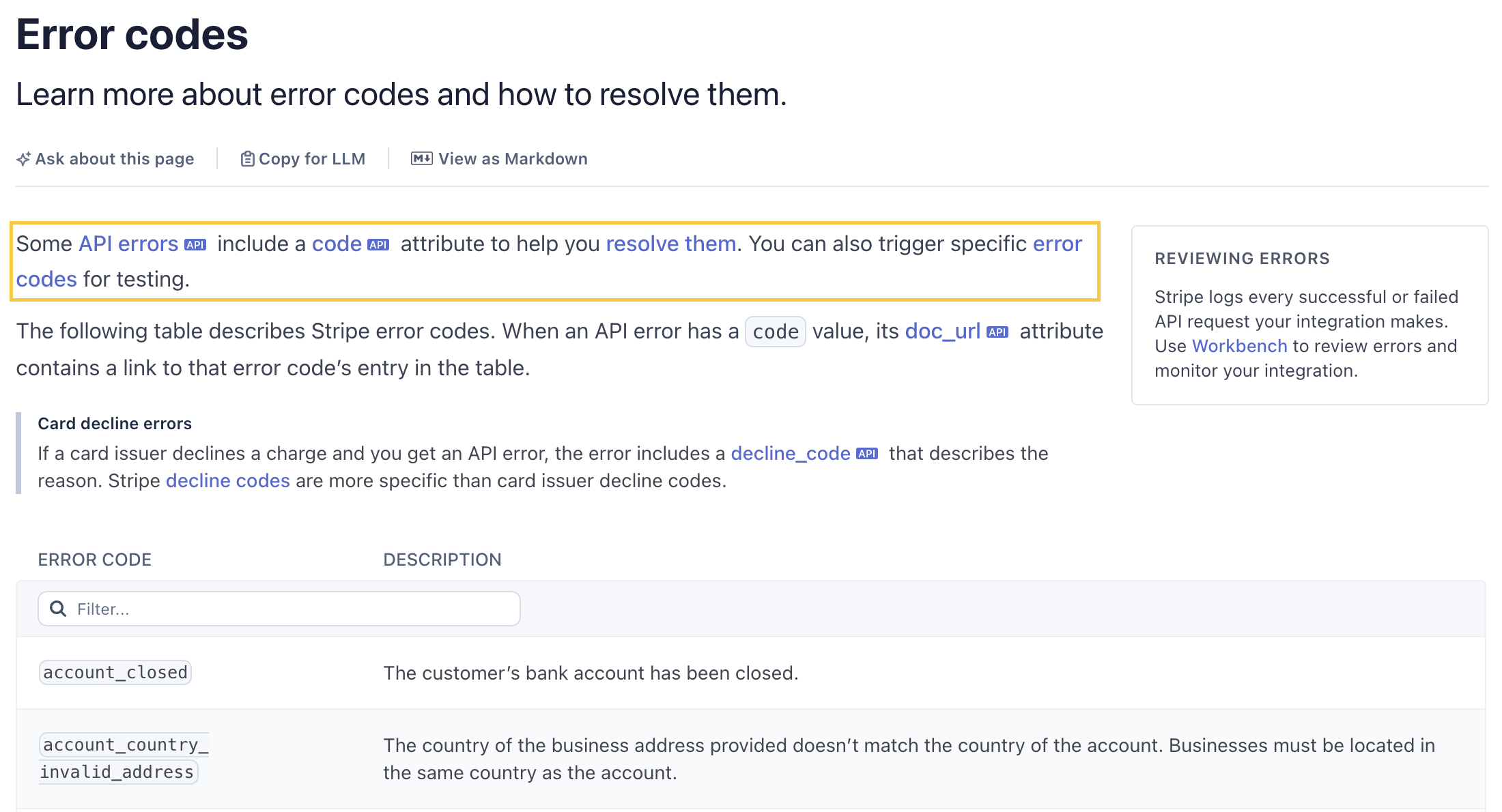
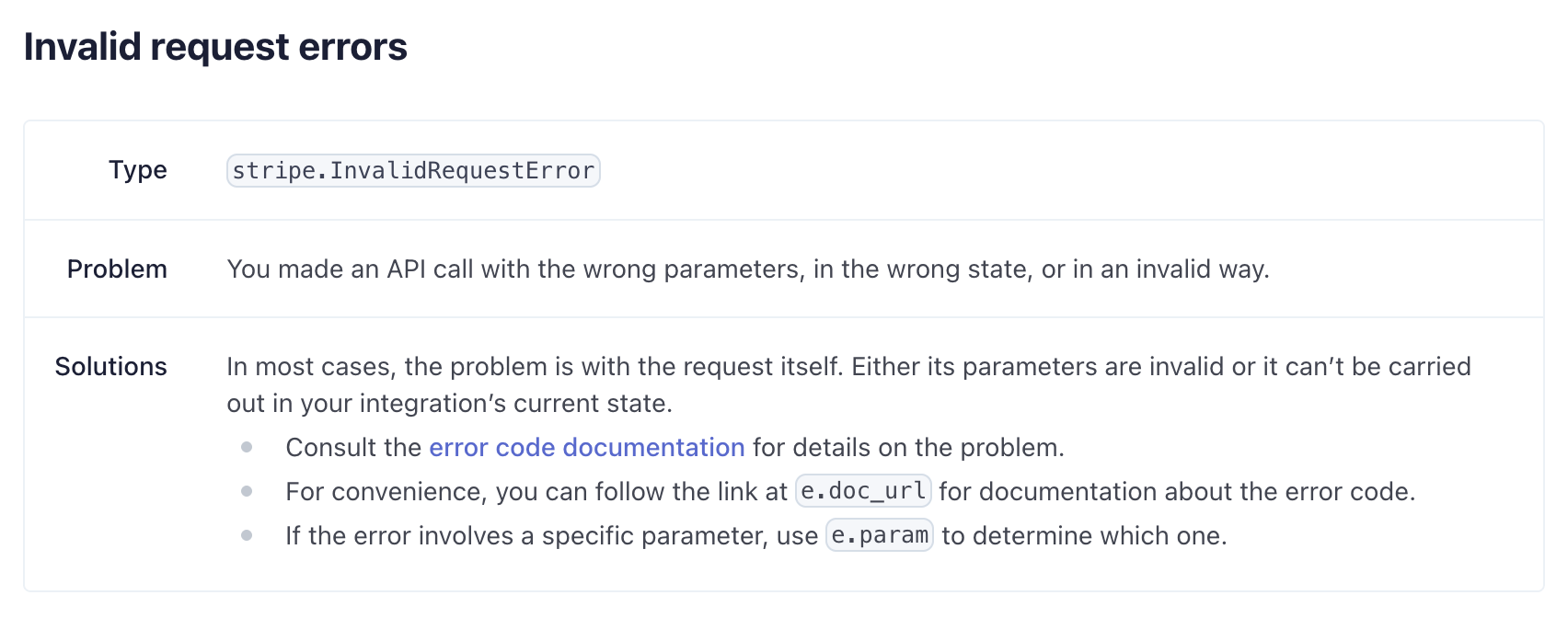
Twilio takes a similar approach. Its Error and Warning Dictionary lists every error code, and each one follows this format with description, possible causes, and possible solutions.
# 400: Bad Request
Log Type: APPLICATION
Log Level: ERROR
## Description
Failed to complete request due to a bad request
### Possible Causes
* The resource to be modified has moved into a state that is no longer valid.* Input on the request did not pass validation.
### Possible Solutions
* Retry the request after confirming the request is valid.* Verify if the resource to be modified exists and is in a valid state.
Supabase has a debugging section under each product area.
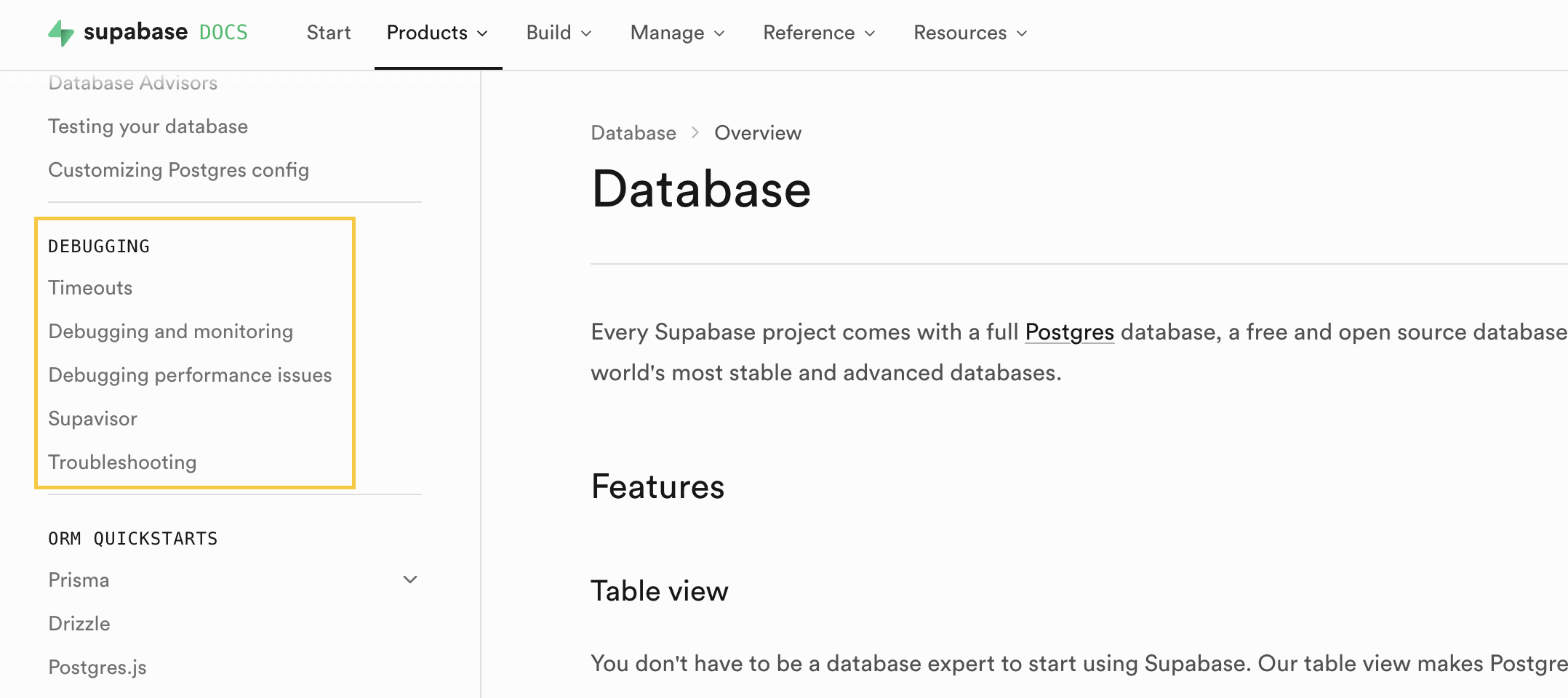
What to do: The lowest-hanging fruit is to add dedicated debugging and error sections, which help humans too. You can either embed them directly on relevant pages (expandable sections are perfect for this) or centralize them into dedicated areas of your docs for each major product surface.
Tip: quote error strings, codes, and types exactly as they appear in your code. Avoid paraphrasing.
If you want to go further, add edge cases and known issues. In general, centralized pages work well for error information; in-page sections work better for edge cases. Some tips on where to find the content:
- GitHub issues or Jira tickets marked with “WON’T FIX”
- changelogs or release notes
- support threads and customer conversations
You can point an LLM at these sources and have it synthesize the recurring patterns into docs.
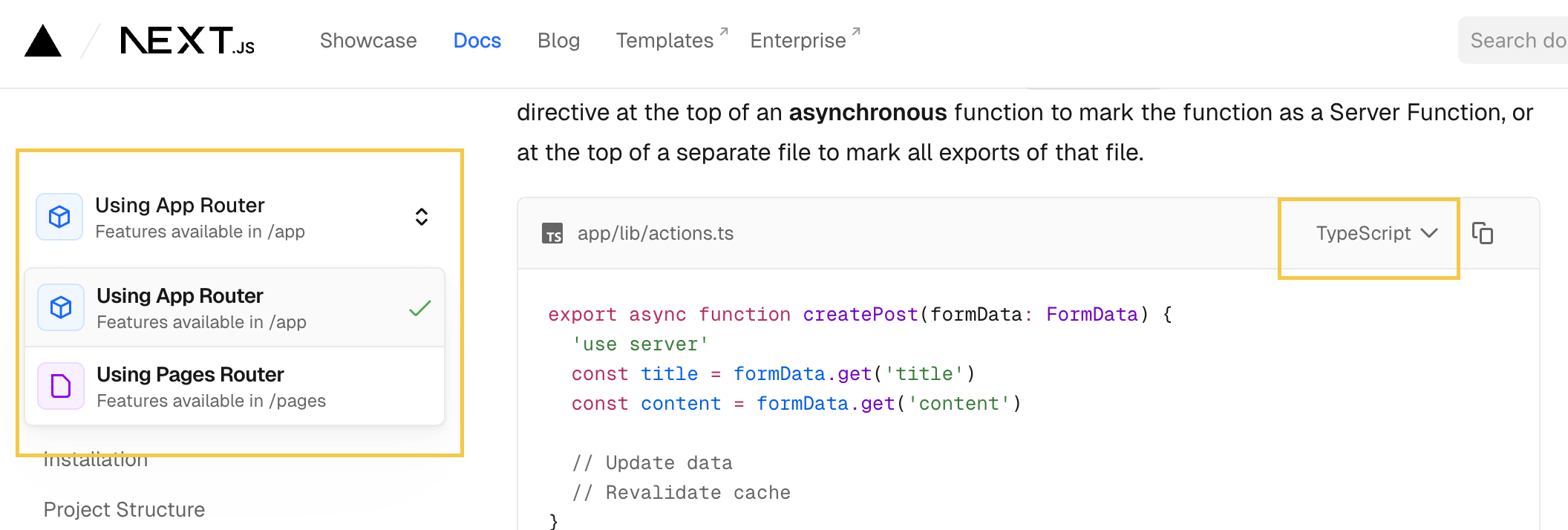
One important caveat: expandable sections only work for agents if the content is already in the page’s HTML and just visually hidden. Content that loads dynamically on click is invisible to agents. To check, ask an agent to fetch one of your docs pages with the component in question and save the output to a file. If the content is there, you’re good; if not, a dedicated sidebar section is the safer bet. (Thank you Lois for raising this!)
In the Next.js docs, the router selector loads a new page on click, so agents only see the actively selected router’s doc page. The language tabs, by contrast, have both js and ts snippets in the HTML, so the agent will see both.
3. Code snippets might matter more than prose
Section titled “3. Code snippets might matter more than prose”In When LLMs Meet API Documentation, researchers tested what happens when you strip different parts of API docs before feeding them to an LLM. Removing code examples caused pass rates to collapse from 66–82% down to 22–39%. Removing parameter descriptions had a much smaller effect.
As to what examples are best, research on the role of diversity in few-shot learning shows that diverse examples outperform ones that are very similar to each other, especially as task complexity increases. The accuracy gain from diversity is 10.72% on hard tasks versus 5.11% on easy ones. Diverse examples also generalize better when an agent’s query differs from the exact scenario an example was designed for.
Should you include negative examples? You can, but tread carefully because the research is mixed.
1. The key is contrastive. There is extensive research showing that contrastive in-context learning improves LLM performance, but the key word is “contrastive.” A negative example needs a paired positive to produce that benefit; a negative example in isolation is more likely to hurt.
2. Subtle wrong beats obviously wrong. Examples near the model’s decision boundary are the most effective (per research on negative sample quality in LLM training). If you include negative examples, “subtly wrong” or “plausibly correct but wrong” outperforms “blatantly wrong.” Trivial formatting errors also don’t add much and can backfire if the model imitates them.
3. Add comments inside your code snippets. Research on in-context learning for instruction following found that LLMs sometimes treat demonstration examples as additional tasks to complete, causing the main task to fail or get stuck. Moreover, a large-scale analysis of 673 agent skills (Carey 2026, thank you Dachary for the feedback on this!) found contamination patterns with examples (for instance, shell syntax appearing in JavaScript outputs). Adding comments inside the code blocks will reduce their dependency on the surrounding markdown text, and help the model distinguish examples from instructions, positive cases from negative ones, and example for one part of the docs from another.
What to do: For your most critical API reference and how-to pages, invest in a small, curated set of examples rather than as many as you can find. Prioritize diversity over volume, especially for complex workflows. Add inline comments to make the intent of each snippet explicit, whether it is a correct example, a near-miss, or a step in an instruction sequence, so that you’re not relying solely on the surrounding markdown text. If you need inspirations for examples, support tickets are often a great source for near-miss cases that real users encounter.
The main downside of adding examples across your docs is maintenance overhead. (Or, you can try Promptless 😊)
Not many teams do directory-level examples yet, but top dev tools are trending in this direction. Some maintain dedicated examples directories in their repos (for instance Vercel). Others publish cookbooks (for instance OpenAI). At this scale, diversity matters most, for instance covering varied parameter combinations and use cases. Negative examples don’t translate well to directory scale.
4. Don’t bother optimizing for position
Section titled “4. Don’t bother optimizing for position”The “Lost in the Middle” paper established that LLMs use information near the beginning and end of a context window more reliably than content buried in the middle. This was an important finding, but it was measured in a single LLM call’s prompt window. With agents, we don’t have to follow the previous wisdom to put important information at beginning or end of the pages anymore.
This doesn’t mean agents don’t suffer from “Lost in the Middle”, just that in an agent loop, you have no control over where your doc might end up in the context, and neither does the agent. Optimizing the internal ordering of your page for positional bias is futile when the page itself can appear at step 2 or step 47.
The picture gets murkier still. Research on how positional biases shift as context fills up found that the effect isn’t even stable: up to about half the context window, the classic pattern holds (beginning and end outperform middle). But as the context approaches saturation, recency bias takes over. So at near-full context, the model actually attends most reliably to whatever comes last.
What to do: Just have fun. Write clearly and put the most important information first within each section, which still helps human readers. But no need to reorganize your docs around positional bias effects. Just try to make the pages have distinct concepts, keep it logically coherent internally - something that you already do 😊.
5. Watch your section length
Section titled “5. Watch your section length”Long context is not free. Chroma’s 2025 Context rot report found that performance gradually decreases as context length increases, with more meaningful degradation starting from 30k+ tokens (~22k words), which thankfully is longer than 99.9% of individual doc pages.
There’s another layer to it, which is that performance degrades faster for complex task than for simple ones. A study on recursive language models found that text lookups can handle very long contexts well (even at 1M+ tokens), but multi-step tasks requiring planning and reasoning start failing around 16k–33k tokens. So, counterintuitively, a REST endpoint reference can afford to be much longer than a step-by-step guide of a complex workflow with branching logic and states.
Those thresholds are measured in clean, isolated conditions with a single LLM call. In an actual agent loop, by say step 10, the context is already carrying execution logs, reasoning traces, tool outputs, and content fetched from external pages. The effective headroom available is considerably smaller, though there’s no fixed number because it depends on how the agent handles context pressure.
When agents run low on context headroom, they go through compaction. According to Anthropic’s Effective context engineering for AI agents, a blogpost from Morph, and a survey on prompt compression for LLMs, the two most common approaches are:
- LLM summarization (most common; used by Anthropic, Cursor): An LLM rewrites conversation history into a natural language summary.
- Opaque compression (used by OpenAI): Server-side, non-human-readable compression.
We can’t optimize for #2 since it’s a black box. But for #1, research on context compression for long-horizon LLM agents shows a consistent pattern of what LLM summarization discards:
- repetitive/redundant information
- verbose logs
- meta prose, narrative prose
- formatting and other stylistic tokens
What to do: Signal importance explicitly. Use words like “key,” “critical,” “required,” “optional,” or “forbidden” to help agents distinguish high-value from low-value content
Prefer structured formats (tables, YAML schemas, must/should/must not callouts) over prose for constraints and defaults. Structured content survives LLM summarization better than equivalent narrative descriptions.
Match page length to the task’s reasoning complexity: for simple tasks (authentication, parameter references, error code tables), include as much detail as you want (under ~22k words, which is probably very easy); for complex multi-step workflows, keep pages shorter.
An added benefit of #1 Make sections self-contained becomes clear here. If decision-critical information such as constraints, defaults, prerequisites, etc. accidentally gets lost during context compression, you won’t have a single point of failure because the agent can rediscover this information from other pages.
Cheat sheet by doc type
Section titled “Cheat sheet by doc type”If your team follows Diátaxis, here’s how the guidance in this article maps onto each doc type. Think of it as a reference to consult when working on a specific type, NOT a checklist to implement all at once. If you discover that something works particularly well, or particularly poorly, or want to add to this table, please email me at frances@promptless.ai.
| Category | Suggestions |
|---|---|
| Tutorial | • Keep it to a happy path, don’t turn it into a sprawling decision tree. • State prerequisites, required setup, and expected end state clearly, either inline or in expandable blocks. • After every major step, add a concrete verification checkpoint (“you should now see…”). • Put detours or corner cases in a separate section or into separate how-to pages. • Add a compact troubleshooting guide at the end of each major stage, or have a centralized troubleshooting section. |
| How-to guide | • Make the goal clear in the title and opening sentence. • List prerequisites, constraints, permissions, and/or defaults so the section/page is self-contained. • Add diverse, curated code examples for the most failure-prone steps. Use inline comments inside the snippets to make the intent explicit (correct example vs. near-miss vs. instruction step). • End with “common failures / recovery.” For long workflows, split by phase and make each phase independently executable. • Avoid references that can only be resolved with screenshots or other media on the page. |
| Reference | • Be exhaustive, but structured. Longer pages are tolerable here because lookup tasks degrade less sharply than planning tasks (but still, be reasonable). • Prioritize code examples over prose — stripping examples hurts LLM performance far more than stripping parameter descriptions. Add inline comments to clarify what each snippet demonstrates. • Use stable headings and unified terminology to reduce guesswork for the LLM. • Avoid writing too much prose. |
| Explanation | • Due to lossy compression on prose, do not let explanation pages be the only place a piece of important information lives. • A centralized section of all concepts and definitions covered in the page can help the agent with disambiguating product-specific key terms when it arrives from other parts of the docs or from search. • Add comparison tables (“X vs Y,” “when to use which”). They are fetch-friendly and survive HTML-to-text conversion well. |
Conclusion
Section titled “Conclusion”This is a substantial amount of work:
- Refactoring docs to split or combine pages
- Adding error handling and debugging sections
- Creating and maintaining examples as your software changes
- Adapting page length based on page type and agent type
And that’s before accounting for keeping docs current as the product evolves - which only gets harder as your engineering team ships faster with AI.
If you’re looking for a solution that handles this automatically, book a quick 15-min demo with one of our engineers. 14-day free trial included!
References
Section titled “References”Anthropic Engineering. (2025). Effective Context Engineering for AI Agents. Anthropic Engineering Blog. link
Blankenstein et al. (2025) BiasBusters: Uncovering and Mitigating Tool Selection Bias in Large Language Models. link
Brookes et al. (2025) Evolving Excellence: Automated Optimization of LLM-based Agents. link
Carey, D. (2026). Quality in the Agent Skills Ecosystem: A Structural, Behavioral, and Cross-Contamination Analysis of 673 Skills. link
Del Rosario et al. (2025) Architecting Resilient LLM Agents: A Guide to Secure Plan-then-Execute Implementations. link
Di, Z., Han, J., Zhang, S., Liao, Y., Li, Z., Ji, X., Wang, Y., Yang, Z., Gao, M., Li, B., & Wang, J. (2026). Not All Negative Samples Are Equal: LLMs Learn Better from Plausible Reasoning. link
Chen et al. (2025) When LLMs Meet API Documentation: Can Retrieval Augmentation Aid Code Generation Just as It Helps Developers? link
Dong, Y., Jiang, X., Qian, J., Wang, T., Zhang, K., Jin, Z., & Li, G. (2025). A Survey on Code Generation with LLM-Based Agents. link
Hong, F., Troynikov, O., & Huber, J. (2025). Context Rot. Chroma Research. link
Kalai et al. (2025) Why Language Models Hallucinate. link
Kang et al. (2025) ACON: Optimizing Context Compression for Long-horizon LLM Agents. link
Levy et al. (2025) More Documents, Same Length: Isolating the Challenge of Multiple Documents in RAG. link
Li et al. (2024) Prompt Compression for Large Language Models: A Survey. link
Liu, N. F., Lin, K., Hewitt, J., Paranjape, A., Bevilacqua, M., Petroni, F., & Liang, P. (2023). Lost in the Middle: How Language Models Use Long Contexts. link
Mo, Y., Liu, J., Yang, J., Wang, Q., Zhang, S., Wang, J., & Li, Z. (2024). C-ICL: Contrastive In-Context Learning for Information Extraction. link
Trilcke et al. (2025) Agentic DraCor and the Art of Docstring Engineering: Evaluating MCP-empowered LLM Usage of the DraCor API. link
Veseli, B., Chibane, J., Toneva, M., & Koller, A. (2025). Positional Biases Shift as Inputs Approach Context Window Limits. link
Zhang et al. (2025) Recursive Language Models. link
Xiao, W., & Zhao, H. (2025). The Role of Diversity in In-Context Learning for Large Language Models. link
Zhao, H., Andriushchenko, M., Croce, F., & Flammarion, N. (2025). Is In-Context Learning Sufficient for Instruction Following in LLMs? ICLR 2025. link