

January 2026
New Features:
-
Agent Knowledge Base: View and edit the files that inform how Promptless writes documentation—your style guide, product overview, and documentation guidelines. Find them in Settings under the Agent Knowledge Base tab. Promptless updates these files automatically as it learns from your feedback, but you can also edit them directly.
-
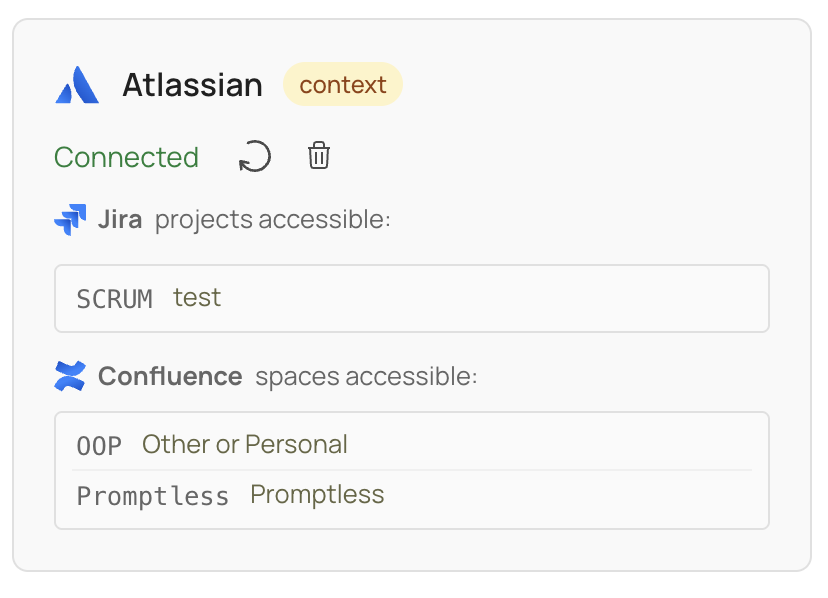
Atlassian Integration (Jira + Confluence): Connect both Jira and Confluence through a single unified Atlassian integration. Promptless now searches your Confluence spaces alongside Jira tickets—pulling documentation patterns, terminology, and architectural decisions when creating suggestions. This replaces the previous Jira-only integration—if you previously connected Jira, reconnect to access Confluence while preserving your Jira project configuration.
-
Guided Onboarding Wizard: A 6-step wizard walks new users through Promptless setup: connecting Slack, connecting your documentation platform, configuring triggers, adding context sources, setting agent preferences, and starting your trial. Progress saves automatically—leave and return to pick up where you left off. Team members from the same organization can continue setup without losing previous progress.
-
Automatic Support Channel: When you connect Slack during onboarding, Promptless creates a shared Slack Connect channel between your team and ours. Use it to ask questions, share feedback, and get support.
-
Self-Service Signup: Sign up for Promptless at accounts.gopromptless.ai—no sales call required.
-
Deep Analysis: Submit large documentation requests—like refactoring entire sections, auditing for consistency, or writing comprehensive docs from scratch. Access Deep Analysis from the sidebar, select your doc collection, describe what you need, and optionally attach supporting files. The Promptless team reviews your request and begins processing, which may create multiple suggestions across your documentation.
-
Triggers Page Search: Search for triggers by PR info, Slack thread topic, task name, or summary text. The default view shows the last 30 days, but search retrieves matching triggers from your full history.
-
Read-Only GitHub App for Open Source Repos: Connect Promptless to open source repositories where you can’t install GitHub apps. The read-only app only requests read permissions—documentation PRs are created from a fork using a Promptless service account. Click GitHub (Read-Only) on the integrations page to get started.
Improvements:
- Faster Response Times: Promptless now processes documentation requests roughly twice as fast—reducing wait times from several minutes to about a minute.
- Intercom Integration: Connect your Intercom Help Center directly from the Integrations page using OAuth—no need to contact support. Publish help center articles and customer support documentation through Promptless.
- Upgraded to Claude Opus 4.5: Documentation suggestions now use Claude Opus 4.5 for improved reasoning, analysis, and documentation context understanding.
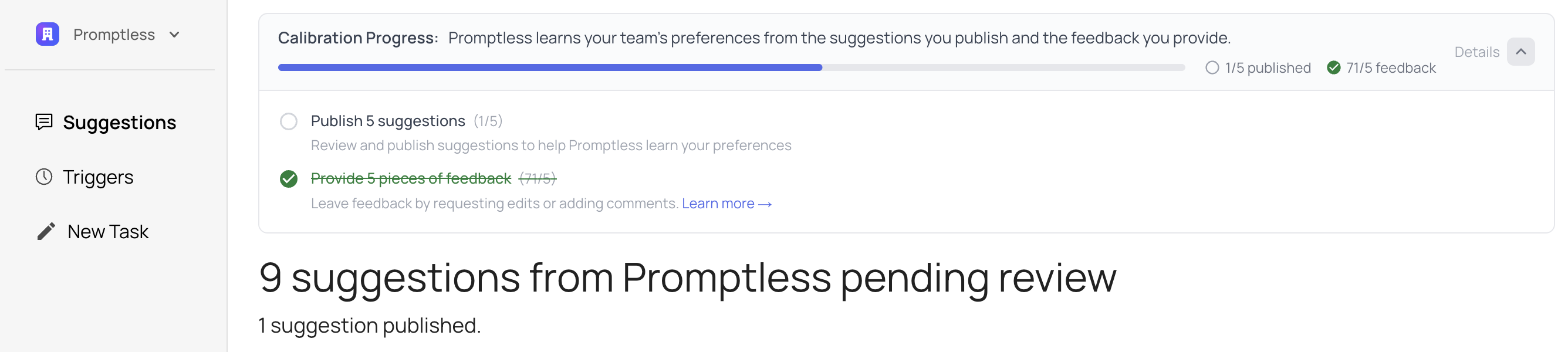
- Calibration Progress Tracking: Track your progress in helping Promptless learn your documentation preferences. The new Calibration Progress banner shows how many suggestions you’ve published and how much feedback you’ve provided—Promptless uses both to understand your writing style, tone, and standards. The banner appears on all dashboard pages until you reach calibration goals (5 published suggestions and 5 pieces of feedback), then disappears automatically.

- Ready Count Includes Open PRs: The Ready count on the Change History page now includes suggestions with open documentation PRs—not just unpublished suggestions. Previously, only suggestions without PRs were counted as ready, so you can now see everything that needs your review in one place.
- Suggestion Lifecycle Improvements: Viewing a suggestion now counts as activity—so suggestions you’re actively reviewing stay active even if no edits are made for over 30 days. You can also view the full diff of any suggestion—even after it’s been closed or merged.
- Change History Page Enhancements: The page now loads faster with suggestion metadata appearing immediately while diffs load in parallel. New filtering by trigger source (Slack, Web UI, GitHub) and estimated review times help prioritize your review queue—sort by “Shortest review” to clear small updates first.
- Screenshot Improvements: Promptless now makes better decisions about when to capture fresh screenshots and can crop them to focus on specific UI elements—highlighting exactly what users need to see without extra clutter.
- Automatic Suggestion Updates from Main: When changes are pushed to your documentation’s main branch, Promptless merges those updates into all open suggestion branches and automatically resolves any conflicts.
- Rich PR Descriptions: Documentation PRs now include a “Promptless Research” section with clickable links to every source reviewed—files, GitHub PRs, Slack conversations, and more—plus an explanation of the changes. For suggestions with multiple triggers, each trigger’s context appears in collapsible sections.
- Inline PR Citations: Citations now appear as review comments on specific lines in your documentation PRs. See the exact source—GitHub PR, Slack message, or Jira ticket—that informed each change directly in the diff view.
- Onboarding Wizard Enhancements: Several improvements throughout the wizard—your docs repository is now automatically excluded when triggering on all repos, monorepo setups prompt you to select specific repositories, help links guide you to documentation when needed, and the calibration card now shows that you’ll receive a Slack notification when PR replays complete. If your Slack connection doesn’t complete, a recovery flow shows options to try again, continue without Slack, or contact your admin.
- Simplified Intercom Connection: Connecting Intercom is now a one-click OAuth flow for all users. Previously, some organizations had to manually create an app in the Intercom Developer Hub and enter an access token—now everyone connects through standard OAuth authorization.
- Slack Notification Channel Picker: The Slack notification channel setting is now a dropdown showing your workspace’s channels instead of a free text field—so you’re always selecting a valid channel. If the channel you want doesn’t appear, create it in Slack first, then refresh your channels on the Integrations page.
- Auto-Merge Restricted to Commit Triggers: Auto-merge is now only available for GitHub commit triggers. If you had auto-merge enabled for PR or other trigger types, it’s been automatically disabled—re-enable it in project settings if needed.
Bug Fixes:
- Confluence Integration Reliability: Fixed an issue where Confluence workspace connection data could be lost when refreshing the integration, making Confluence spaces temporarily unavailable.
- New Task Project Dropdown: Fixed the New Task feature to only show doc collections that have completed analysis—preventing errors when submitting documentation requests. Previously, users could select doc collections that were still being analyzed, which would fail when submitted.
- Promptless Capture Reliability: Fixed intermittent failures when capturing screenshots.
- Citation Display in Editor: Fixed citation icons overlapping when multiple citations reference the same line—they now stack properly for easier viewing.
- Citation Popup Positioning: Fixed citation popup positioning and arrow placement issues in the editor, ensuring popups display correctly even when citations are stacked.
- Comment Bubble Overflow: Fixed comment bubbles extending beyond the editor viewport, keeping all interface elements properly contained within the editing area.
- Cleaner Suggestion Diffs: Fixed suggestion diffs to exclude internal system files—diffs now show only your documentation changes, making them easier to review.
- Slack Notification Diff Files: Fixed diff file attachments in Slack notifications—teams can now see the full diff of documentation changes directly from Slack without needing to open the PR or web interface.
- Slack Notification Delivery: Improved reliability of Slack notifications by automatically retrying on transient errors. Notifications that previously failed due to temporary Slack service issues (5xx errors, connection problems, rate limits) are now retried automatically.
- Slack Bot Message Processing: Fixed an issue where Slack messages from bots—like other integrations or automated workflows—could fail to trigger documentation updates. Bot-authored messages are now processed correctly.
- Git Sync Reliability: Improved reliability of git sync operations when Promptless pushes documentation changes—sync operations now properly wait for concurrent git processes to complete, preventing intermittent failures.
- Git Repository Access Reliability: Fixed intermittent failures from git configuration lock contention when processing multiple documentation updates simultaneously.
- GitHub PR Processing: Improved reliability when processing GitHub PRs with many file changes—Promptless now handles large PRs with multiple files more consistently, preventing intermittent errors during analysis.
- Background Job Processing: Improved reliability of background job processing—jobs now properly initialize cache clients, preventing intermittent failures during documentation generation.
- Suggestion Tracking with Multiple Doc Collections: Fixed suggestion tracking with multiple doc collections—trigger events now link to the correct suggestions. Previously, when multiple agents responded to the same trigger (like a Slack message) but used different doc collections, trigger events could link to the wrong suggestion.
- Change History Page Performance: Improved performance and reliability of the Change History page when viewing suggestions—page updates now happen more efficiently to ensure consistent functionality.
- Impacted File List Accuracy: Suggestion diffs now show only documentation files—internal Promptless system files no longer appear in the impacted files list, making it easier to see exactly which documentation files changed.
- Re-opened Docs PRs Now Resume Correctly: Re-opening a docs PR now restores the suggestion so you can continue editing. Previously, follow-on instructions weren’t processed after closing and re-opening a PR.
- Suggestion Editing Reliability: Fixed an issue where editing existing suggestions could fail—the system was incorrectly looking for suggestion branches in the wrong storage location.
- Internal Evaluation Infrastructure: Fixed inconsistent default resource configurations in the evals system—resource defaults are now maintained in a single authoritative location, improving reliability of internal evaluation runs.
- Suggestion Stability for Revert PRs: Fixed an issue where suggestions could be incorrectly deleted when processing PRs that revert previously documented changes—suggestions now remain active and continue receiving updates correctly.
- PR Replay Status Accuracy: Fixed PR replays to show the correct PR status on the Triggers page. Previously, replayed PRs always showed “open” status regardless of whether the PR was actually merged, closed, or in draft state.
- GitHub Trigger Icons: Fixed the Change History page to show the GitHub icon for all GitHub-based triggers—including GitHub Enterprise PRs, merged PRs, and GitHub Issues. Previously, the icon only appeared for regular open PRs.
- GitHub PR Event Filtering: Fixed an issue where Promptless could trigger on PR events like
editedorsynchronizeinstead of only triggering when PRs are opened, marked ready for review, or reopened. - GitHub Integration Reliability: Promptless now handles server clock drift that could cause intermittent authentication errors and automatically retries operations when GitHub’s API returns transient server errors.
- Duplicate Trigger Context in PRs: Fixed trigger context appearing twice in documentation PRs—once in the PR description and again as separate comments. Trigger context now appears only in the PR description.
- Large Image Processing: Fixed failures when processing triggers with large images. Promptless now automatically compresses images that exceed size limits, so you can include high-resolution screenshots and images in Slack messages, GitHub issues, or other triggers without issues.
- Documentation PR Update Reliability: Fixed intermittent failures when updating documentation PRs with new changes. Promptless now handles transient GitHub API timing issues more gracefully, ensuring suggestions are consistently applied to your docs PRs.
- Onboarding Wizard Stability: Fixed multiple issues in the onboarding wizard—including OAuth integration setup, progress saving after connecting Slack, trigger dropdowns showing placeholder data, agent preferences not persisting, PR replays not starting for GitHub triggers, Slack notification channel settings being lost when resuming onboarding, and various visual glitches during page transitions.
- Slack Connect Channel Visibility: Fixed an issue where Slack Connect support channels were created as private in your workspace—support channels now appear as public, so you can invite other team members from your organization.
- High-Volume Trigger Processing: Fixed intermittent errors when processing triggers for organizations with many concurrent documentation tasks.
- Review Time Estimate Accuracy: Fixed review time estimates being inflated for repositories with mixed line endings (CRLF and LF). Estimates now accurately reflect the actual scope of documentation changes.
- Suggestion Timestamp Display: Fixed suggestion timestamps showing incorrect times—such as appearing hours in the future—when viewing the Change History page.
- Agent Knowledge Base Persistence: Fixed an issue where edits to Agent Knowledge Base files could be lost between documentation processing runs—your customizations now persist properly.
- Fork-Based PR Creation Reliability: Fixed an issue where documentation PRs created through the GitHub (Read-Only) integration could fail when forks have non-default names—Promptless now uses GitHub’s default fork naming to ensure reliable cross-repo PR creation.
- PR Binary File Processing: Fixed an issue where analyzing PRs that contain binary files (like updated screenshots) could fail—Promptless now handles these PRs correctly.