

Pay down docs debt with Deep Analysis
Use Deep Analysis when a request needs more research or scope than a regular trigger can handle. Instead of producing a single drive-by edit, Promptless reviews your source code, audits your existing docs, and returns a coordinated set of suggestions.
When to use Deep Analysis
Section titled “When to use Deep Analysis”Deep Analysis is built for projects that span multiple pages, need background research, or call for a coherent plan before any edits land:
- Refactoring documentation sections: restructure or rewrite an entire section to match a new pattern or stronger examples.
- Documentation audits: check the whole collection for consistency, accuracy, or style compliance.
- Writing docs from scratch: produce comprehensive documentation for a new feature or product.
- Filling in OpenAPI specs: add error codes, examples, or other structured data across an API reference.
For routine updates, stick with Slack, GitHub PR triggers, or a regular New Task. Deep Analysis is heavier and slower, so reach for it when the work genuinely calls for it.
Submit a request
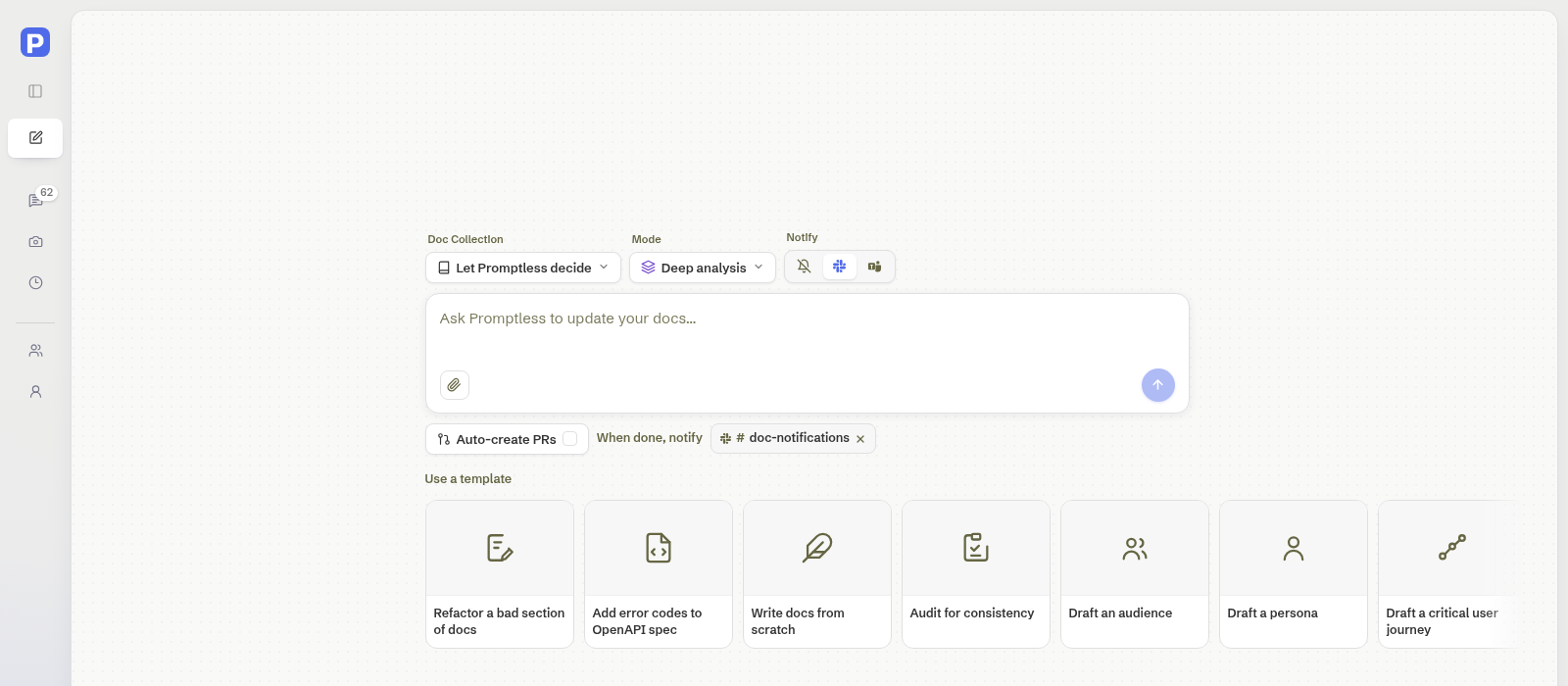
Section titled “Submit a request”Deep Analysis runs through the New Task composer. Set Mode to Deep analysis, then describe the project in the instructions field.
-
Open New Task. Click New Task in the sidebar. You can also use the Deep Analysis deep link. It opens New Task with Deep analysis already selected in the Mode chip.
-
Choose a doc collection (optional). The Doc Collection chip defaults to Let Promptless decide, which picks the collection or collections the task affects. Choose a specific collection if you want to scope the run yourself. Only collections that have finished initial analysis appear in the list.
-
Set Mode to Deep analysis. Open the Mode chip and choose Deep analysis (many agents, many PRs). Default runs the full writer workflow and is selected until you change it. (Already set if you used the deep link or picked a template.)
-
Pick a template (optional). Under Use a template, choose one of the four template cards to fill the instructions field with a starter prompt. Templates include placeholder hints in
{curly braces}so you know what context to add. Choosing a template replaces anything already in the instructions field, including instructions you already typed. Clicking the selected card again clears the field entirely. Pick your template before you write your own instructions. Selecting a template also switches Mode to Deep analysis. -
Write the instructions. Describe the project in the instructions field. Include the product area, source code or APIs Promptless should inspect, examples to model, and the changes you want to focus on. There is no separate title field: the first line of your instructions becomes the request title. If you pick or change a template after writing, it overwrites what you’ve written (see step 4).
-
Attach files (optional). Click the paperclip in the instructions field (Attach files) to add supporting material like screenshots, PDFs, or specs. You can also paste an image directly into the field. You can include up to 5 files, 10 MB each.
-
Choose delivery settings. The Notify control preselects your organization’s configured Slack channel. Promptless resolves it from your
promptless.yamlpolicies: the notification channel, or the escalation channel when that’s the only one set. The preselected channel follows the Doc Collection you choose, so it matches where this run posts. It stays on No notification when your organization has no Slack channel configured. You can still pick a different Slack channel, or set it to No notification. Turn on Auto-create PRs to open PRs automatically for this task’s suggestions and skip the manual review step for each one. -
Submit. Click the submit arrow at the bottom right of the instructions field. Pressing Enter adds a newline instead of submitting. Promptless confirms the submission and links to the Triggers page so you can follow progress.
Templates
Section titled “Templates”Deep Analysis ships with four templates for the most common project shapes:
- Refactor a bad section of docs: improve an existing section using another set of docs as a model.
- Add error codes to OpenAPI spec: add comprehensive error codes and examples to your API specification.
- Write docs from scratch: produce new documentation with guidance on outline, audience, and style.
- Audit for consistency: review all documentation for consistent terminology, formatting, and structure.
Each template seeds the Instructions field with a title line, a description, and bracketed placeholders that prompt you for the context Promptless needs. You can edit the prefilled text freely before submitting.
What happens after you submit
Section titled “What happens after you submit”A Deep Analysis trigger is routed to a fresh agent with the Deep Analysis workflow enabled. Before drafting any documentation, that agent runs two mandatory research passes:
- A source code review of the configured source repos to confirm how the feature actually behaves today.
- A docs audit of the target collection to find related pages, gaps, duplicates, terminology, and writing conventions.
Once both reviews are complete, the agent plans the work and produces one or more suggestions. The trigger appears on the Triggers page labeled Deep Analysis: <your instructions>, so it’s easy to spot among regular tasks.
If Slack is connected and you picked or kept a notification channel, Promptless posts updates there as the run progresses. It posts again when the suggestions are ready for review.
Need help with Deep Analysis? Contact us at help@gopromptless.ai.