

GitLab integration
Used for: Triggers, Context, and Publishing
Promptless connects to GitLab in two directions. Promptless uses a GitLab group access token to pull information from GitLab: merge requests, repository files, and project metadata. GitLab uses webhooks to notify Promptless when merge requests change. Promptless requests a group access token (not a project access token), so a single group connection covers all three jobs: triggers, context, and publishing. Promptless supports both gitlab.com and self-hosted GitLab.
Installation
Section titled “Installation”Setup has two parts: create a group access token in GitLab, then connect it in Promptless.
-
Create a GitLab group access token. You need the Owner role for the group, since GitLab restricts group access token creation to group Owners. If you don’t have it, ask a group Owner to create the token. In GitLab, go to your group’s Settings > Access Tokens and click Add new token, then:
- Name it (for example, “Promptless”).
- Set an expiration date (maximum one year).
- Select the
apiscope. - Choose the Maintainer role.
Click Create group access token and copy it immediately. GitLab shows it only once. The token starts with
glpat-. For more details, see GitLab’s group access token documentation. -
Open the Integrations page in the Promptless dashboard.
-
Start the GitLab connection. For a gitlab.com group, find the GitLab tile and click Connect GitLab. For a self-hosted instance, use the Self-hosted GitLab tile instead, click Connect Self-hosted GitLab, and enter your Instance hostname. Enter just the host, with no
https://and no path (for example,gitlab.acme.com). -
Enter the group path and paste the token. In the Group path field, enter the group’s full path (for example,
acme/platform). Paste the token into the Access token field, then click Connect.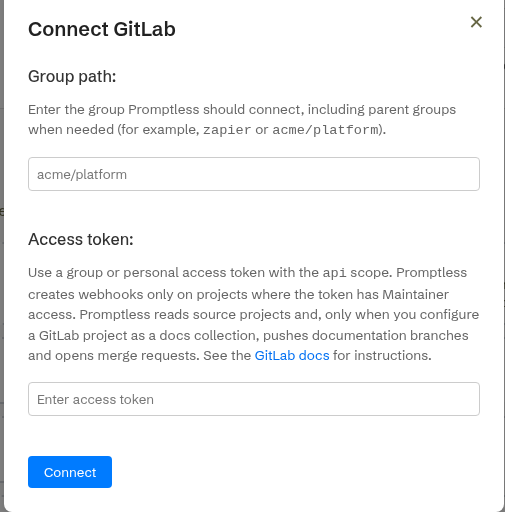
Connected groups
Section titled “Connected groups”Each connected group appears as its own card on the Integrations page. Each card is titled GitLab (gitlab.com) for a gitlab.com connection, or GitLab · <host> for a self-hosted instance. Every card shows a Host: line (gitlab.com for a gitlab.com connection, or the self-hosted domain) and a Group: line with the connected group. The card lists the connected group’s projects by full path (for example, promptless-engineers/<repo>), sorted alphabetically.
The card’s manual Refresh re-syncs the project inventory. Projects added to a group after you connect it appear only after you refresh.
Project setup
Section titled “Project setup”After connecting your GitLab account, you can configure how Promptless interacts with your projects:
Repository access
Section titled “Repository access”When setting up a project with GitLab as a trigger source:
- Select the GitLab projects you want Promptless to monitor for changes.
- Optionally, configure directory-specific triggers to focus on particular parts of your codebase.
Directory-specific triggers
Section titled “Directory-specific triggers”You can configure Promptless to only trigger documentation updates when changes are made to specific directories in your GitLab projects. This is useful for:
- Focusing on code that directly impacts user-facing features
- Monitoring API changes that require documentation updates
- Ignoring internal tooling or test changes that don’t affect documentation
To set up directory-specific triggers:
- In your project configuration, select the GitLab project.
- Under Advanced Options, enable Directory-Specific Triggers.
- Enter the directories you want to monitor, separated by commas (for example,
src/api, docs/reference).
Merge request link resolution
Section titled “Merge request link resolution”When you share a GitLab.com merge request link in a Slack message or other trigger, Promptless automatically fetches the MR content. This includes:
- MR metadata (title, state, source/target branches, author)
- Discussion comments with file positions and resolved state
- The full diff for analysis
This allows Promptless to gather context from linked merge requests.
Source code reading
Section titled “Source code reading”Promptless can read source files directly from your GitLab projects when processing merge requests or researching documentation updates. This provides context from implementation details that aren’t visible in merge request diffs alone.
Promptless uses the GitLab CLI (glab) to fetch file contents from your repositories. This is useful when:
- A merge request references code in files that weren’t changed
- A new feature needs to be understood in the context of existing code
- Documentation requires accurate details about implementation behavior
Publishing documentation to GitLab
Section titled “Publishing documentation to GitLab”Beyond triggers and context, a GitLab project can also be a doc collection: a place where your documentation lives and where Promptless publishes updates. When documentation needs to change, Promptless clones the project, edits files on a new branch, and pushes that branch. It then opens a merge request for you to review, the same way it opens pull requests on GitHub.
To publish to GitLab, your connected group access token needs the write-capable api scope, the same scope the integration already uses for triggers. Promptless writes only to the projects you set up as doc collections.
GitLab doc collections work on both gitlab.com and self-hosted GitLab, and both are set up the same way. The project picker lists your connected GitLab projects across every connected instance. A GitLab host field on the same form takes your self-hosted hostname; leave it blank for gitlab.com. See GitLab projects for setup details. See the configuration reference for the platform: gitlab and host fields.
Promptless tracks merge request status the same way it tracks GitHub pull request status. Because GitLab has no draft flag at creation time, Promptless marks a draft merge request with a Draft: title prefix.
Auto-merge differs from the GitHub path. On GitLab, Promptless attempts the merge immediately instead of waiting for a pipeline. See Automatic merge request creation before you enable it.
Authentication model
Section titled “Authentication model”The GitLab integration authenticates with a group access token:
- Group Access Token: A token with the
apiscope for full API access. - Webhook Triggers: Work with both gitlab.com and self-hosted GitLab instances.
- Publishing (doc collections): Works with both gitlab.com and self-hosted GitLab instances.
- Link Resolution: Works with gitlab.com only.
- Source Code Reading: Works with gitlab.com only.
The token’s scope and role limit what Promptless can do. See Token scope considerations for which projects it can reach and why Promptless enforces the per-project boundary rather than the token.
Token scope considerations
Section titled “Token scope considerations”GitLab has no read-only option. Connecting a GitLab group always performs writes with the group access token. It creates the merge-request webhooks across the group’s projects, and it also sets the Promptless bot avatar as an incidental additional write. Webhook creation is the hard blocker. A read-only (read_api) token cannot create those webhooks, so the integration delivers no merge-request triggers and is connected but inert. Unlike the GitHub (read-only) app, GitLab has no read-only equivalent, so even a triggers-and-context-only setup needs a write-capable token.
The group access token needs the api scope and the Maintainer role. This is what the connect flow recommends and what a working connection requires. Maintainer is required because connecting a group always sets up the merge-request webhooks across the group’s projects. Creating those webhooks requires the Maintainer role. Publishing on its own (pushing a branch and opening a merge request) needs only lower privilege: at least the Developer role for those write operations. But because every connection sets up webhooks, Maintainer is the effective requirement for any GitLab connection. That holds whether you use it as a trigger and context source, a docs destination, or both. A Developer-role token completes the initial connect but receives no webhooks (the failure is swallowed silently). It then hard-fails on the next refresh, so it is not a viable option. The clean, safe recommendation is api scope with the Maintainer role.
Promptless writes only to the projects you configure as doc collections. That’s an application-level restriction Promptless enforces. The token itself doesn’t impose it.
Two layers limit what Promptless can reach. The first is a hard, token-level limit. Suppose you scope the group access token to a group or subgroup that contains only your documentation projects. The token then can’t reach anything outside it. Scoping the token to a documentation-only subgroup is safe only in one case. Your trigger and context source projects and your docs-destination projects must all live within that same group or subgroup. Otherwise the token can’t reach source projects outside it. The second is an application-level path scope on the doc collection, which limits which files Promptless can change.
Webhook management
Section titled “Webhook management”Promptless automatically sets up webhooks in your GitLab projects to monitor merge-request activity. These webhooks:
- Trigger Promptless when merge requests are created or updated.
- Deliver merge-request comments that mention Promptless, so a tagged comment can request documentation work. See Request documentation via merge-request comments.
- Send only the necessary information about changes to Promptless.
- Can be customized to focus on specific events.
Once configured, the GitLab integration works similarly to other code hosting integrations:
- When a merge request is opened or updated in your monitored projects, Promptless is automatically triggered.
- Promptless analyzes the changes to determine if documentation updates are needed.
- If updates are needed, Promptless generates the appropriate documentation changes.
- Promptless adds a comment to your GitLab merge request with a link to review the documentation changes.
- You can review and approve the suggested documentation updates in the Promptless dashboard.
For more information on how triggers work in general, see the Triggers documentation.
Frequently asked questions
Section titled “Frequently asked questions”I connected a GitLab group but no merge request triggers arrive. What’s wrong?
A read-only read_api token can’t create the merge-request webhooks a GitLab connection needs, so the group connects but stays inert. Recreate the token with the api scope and the Maintainer role, then reconnect. See Token scope considerations for why GitLab has no read-only option.
My token has the api scope but I still get no merge request triggers. Why?
A Developer-role token can’t create the merge-request webhooks a GitLab connection sets up, because only the Maintainer role can. Recreate the token with the Maintainer role and reconnect. See Token scope considerations.
A project I added to my group doesn’t appear under the connected group. How do I fix it?
Promptless syncs the project inventory when you connect a group, so projects added later don’t appear automatically. Open the group’s card on the Integrations page and click Refresh to re-sync the inventory.